|
Internal Revenue Bulletins |

| Home >
Internal Revenue Bulletins > 2005 > Bulletin No. 2005-50 > Revenue Procedure 2005-74
|
|
|||||||||||||||||||||||||||||||||||||||||||||||||||||||||||||||||||||||||||||||||||||||||||||||||||||||||||||||||||||||||||||||||||||||||||||||||||||||||||||||||||||||||||||||||||||||||||||||||||||||||||||||||||||||||||||||||||||||||||||||||||||||||||||||||||||||||||||||||||||||||||||||||||||||||||||||||||||||||||||||||||||||||||||||||||||||||||||||||||||||||||||||||||||||||||||||||||||||||||||||||||||||||||
In addition, the Substitute Forms Program Unit can be contacted via email at *[email protected]. Please enter �Substitute Forms� on the subject line. For questions about Forms W-2 and W-3, refer to IRS Publication 1141, General Rules and Specifications for Substitute Forms W-2 and W-3. For Forms W-2c and W-3c, refer to IRS Publication 1223, General Rules and Specifications for Substitute Forms W-2c and W-3c. For Forms 941 and Schedule B (Form 941), refer to IRS Publication 4436, General Rules and Specifications for Substitute Form 941 and Schedule B (Form 941). For Forms 1096, 1098, 1099, 5498, W-2G, and 1042-S, refer to IRS Publication 1179, General Rules and Specifications for Substitute Forms 1096, 1098, 1099, 5498, W-2G, and 1042-S. The following changes have been made to the Revenue Procedure for 2005:
A tax form (or related schedule) that differs in any way from the official
version and is intended to replace the form that is printed and distributed
by the IRS. This term also covers those approved substitute forms exhibited
in this revenue procedure. A form produced using conventional printing processes, or a printed form which has been reproduced by photocopying or a similar process. A printed form that has marginal perforations for use with automated and high-speed printing equipment. A preprinted form in which the taxpayer's tax entry information has been inserted by a computer, computer printer, or other computer-type equipment such as word processing equipment. A tax return or form that is entirely designed and printed using a computer printer such as a laser printer, etc., on plain white paper. This return or form must conform to the physical layout of the corresponding IRS form, although the typeface may differ. The text should match the text on the officially printed form as closely as possible. Condensed text and abbreviations will be considered on a case-by-case basis. Exception. All jurats (perjury statements) must be reproduced verbatim. A preprinted reproduced form in which the taxpayer's tax entry information
is entered by an individual using a pen, pencil, typewriter, or other non-automated
equipment. Parts of a printed tax form that are not tax amount entries or required
text. Examples of graphics are line numbers, captions, shadings, special indicators,
borders, rules, and strokes created by typesetting, photographics, photocomposition,
etc. A document providing detailed information to support a line entry on an official or approved substitute form and filed with (attached to) a tax return. Note. A supporting statement is not a tax form and does not take the place of an official form. The following specific terms are used throughout this revenue procedure in reference to all substitute forms: format, sequence, line reference, item caption, and data entry field. Sequence is an integral part of the total format requirement. The substitute form should show the same numeric and logical placement order of data, as shown on the official form. The line numbers, letters, or alphanumerics used to identify each captioned line on an official form. These line references are printed to the immediate left of each caption and/or data entry field. Designated areas for the entry of data such as dollar amounts, quantities,
responses and checkboxes. A draft version of a new or revised form may be posted to the IRS website for information purposes. Substitute forms may be submitted based on these advance drafts, but any company that receives forms approval based on these early drafts is responsible for monitoring and revising forms to mirror any revisions in the final forms provided by the IRS. Any person or company who uses substitute forms and makes all or part of the changes specified in this revenue procedure agrees to the following stipulations:
If you produce any tax forms using IRS guidelines on permitted changes, you can generate your own substitutes without further approval. If your changes are more extensive, you must get IRS approval before using substitute forms. More extensive changes can include the use of typefaces and sizes other than those found on the official form and the condensing of line item descriptions to save space. The Substitute Forms Program now accepts substitute forms submissions via email. The email address is *[email protected]. Please include �PDF Submissions� on the subject line. Follow these guidelines.
If the guidelines are not followed, you may need to resubmit. In addition to submitting forms via email, you may continue to send your submissions to: Internal Revenue Service Follow these basic guidelines for expediting the process.
Schedules are considered to be an integral part of a complete tax return. A schedule may be included as part of a form or printed separately. Form 706, United States Estate (and Generation-Skipping Transfer) Tax Return, is an example of this situation. Its Schedules A through U have pages numbered as part of the basic return. For Form 706 to be approved, the entire form including Schedules A through U must be submitted. However, Schedules 1, 2, and 3 of Form 1040A are examples of schedules that can be submitted separately. Although printed by the IRS as a supplement to Form 1040A, none of these schedules are required to be filed with Form 1040A. These schedules may be separated from Form 1040A and submitted as substitute forms. The IRS is continuing a program to identify and contact tax return preparers, forms developers, and software publishers who use or distribute unapproved forms that do not conform to this revenue procedure. The use of unapproved forms hinders the processing of the returns. Official IRS tax forms are supplied by the IRS. These forms may be provided in the taxpayer�s tax package or over-the-counter. Forms can also be picked up at many IRS offices, post offices, or libraries, and are available on CD-ROM and online at www.irs.gov. There are methods of reproducing IRS printed tax forms suitable for use as substitutes without prior approval.
All payment vouchers (Forms 940-V, 940-EZ(V), 941-V, 943-V, 945-V, 1040-V, and 2290-V) must be reproduced in conjunction with their forms. Substitute vouchers must be the same size as the officially printed vouchers. Vouchers that are prepared for printing on a laser printer may include a scan line.
Code Number for Forms:
Type Number for:
The voucher size must be exactly 8.0?? x 3.25?? (Forms 1040-ES and 1041-ES must be 7.625?? x 3.0??). The document scan line must be vertically positioned 0.25 inches from the bottom of the scan line to the bottom of the voucher. The last character on the right of the scan line must be placed 3.5 inches from the right leading edge of the document. The minimum required horizontal clear space between characters is .014 inches. The line to be scanned must have a clear band 0.25 inches in height from top to bottom of the scan line, and from border to border of the document. �Clear band� means no printing except for dropout ink. Vouchers must be imaged in black ink using OCR A, OCR B, or Courier 10. These fonts may not be mixed in the scan line. The horizontal character pitch is 10 CPI. The preferred paper weight is 20 to 24 pound OCR bond. Certain vouchers may be reproduced for use in the IRS lockbox system. These include the 1040 family, the 940 family, and 2290 vouchers. Software developers must follow these specific guidelines to produce scannable vouchers strictly for lockbox purposes. Also see Exhibit C.
Note. All software developers must ensure that their software uses OCR A font so taxpayers will be able to print the vouchers in the correct font. Follow these line specifications for entering taxpayer data in the lockbox vouchers.
To receive approval, please send 50 samples of your vouchers for testing to the following address. Internal Revenue Service For further information, contact either Doris Bethea, [email protected], at 202-283-0218 or Leticia Guzman, [email protected], at 202-283-0365. You cannot, without prior IRS approval, change any IRS tax form or use your own (non-approved) versions including graphics, unless specifically permitted by this revenue procedure. You cannot adjust any of the graphics on Forms 1040, 1040A, and 1040EZ (except in those areas specified in Part 5 of this revenue procedure) without prior approval from the IRS Substitute Forms Unit. You cannot use your own preprinted label on tax returns filed with the IRS unless you fully comply with the criteria specified in Section 3.6.3 on the use of pre-addressed IRS labels. Preparers who submit substitute privately designed, privately printed, computer generated, or computer prepared tax forms must develop these substitutes using the guidelines established in this part. These forms, unless excepted by the revenue procedure, must be approved by the IRS before being filed. The IRS cannot grant final approval of your substitute form until the official form has been published. However, the IRS posts advance draft forms in the �Tax Professionals� area of its website at: www.irs.gov/taxpros/lists/0,,id=97782,00.html We encourage submission of proposed substitutes of these advance draft forms and will grant conditional approval based solely on these early drafts. These advance drafts are subject to significant change before forms are finalized. If these advance drafts are used as the basis for your substitute forms, you will be responsible for subsequently updating your final forms to agree with the final official version. These revisions need not be submitted for further approval. Note. Approval of forms based on advance drafts will not be granted after the final version of an official form is published. Follow these general guidelines when submitting substitute forms for approval.
Because only the Substitute Forms Unit is authorized to approve substitute forms, unnecessary delays may occur if forms are sent to the wrong office. The Substitute Forms Unit may then coordinate the response with the initiator responsible for revising that particular form. Such coordination may include allowing the initiator to officially approve the form. No IRS office is authorized to allow deviations from this revenue procedure. The IRS does not review or approve the logic of specific software programs, nor does the IRS confirm the calculations on the forms produced by these programs. The accuracy of the program remains the responsibility of the software package developer, distributor, or user. The Substitute Forms Unit is primarily concerned with the pre-filing quality review of the final forms that are expected to be processed by IRS field offices. For this purpose, you should submit forms without including any taxpayer information such as names, addresses, monetary amounts, etc. Proposed substitutes, which are required to be submitted per this revenue procedure, should be sent as much in advance of the filing period as possible. This is to allow adequate time for analysis and response. When submitting sample substitutes, you should include an accompanying statement that lists each form number and its changes from the official form (position, arrangement, appearance, line numbers, additions, deletions, etc.). With each of the items you should include a detailed reason for the change. When requesting approval, please include a check sheet. Check sheets expedite the approval process. The check sheet may look like the example in Exhibit D displayed in the back of this procedure or may be one of your own design. Please include your fax number on the check sheet. The Substitute Forms Unit will fax the check sheet or an approval letter to the originator if a fax number has been provided, unless:
Notice of approval may impose qualifications before using the substitutes. Notices of unapproved forms may specify the changes required for approval and require re-submission of the form(s) in question. Telephone contact is used when appropriate. Most signature tax returns and many of their schedules and related forms have the tax (liability) year printed in the upper right corner. Approvals for these forms are usually good for one calendar year (January through December of the year of filing). Quarterly tax forms in the 940 series and Form 720 require approval for any quarter in which the form has been revised. Because changes are made to a form every year, each new filing season generally requires a new submission of a substitute form. Very rarely is updating the preprinted year the only change made to a form. Limited changes approved for one tax year may be allowed for the same form in the following tax year. Examples are the use of abbreviated words, revised form spacing, compressed text lines, and shortened captions, etc., which do not change the integrity of lines or text on the official forms. If substantial changes are made to the form, new substitutes must be submitted for approval. If only minor editorial changes are made to the form, it is not subject to review. It is the responsibility of each vendor who has been granted permission to use substitute forms to monitor and revise forms to mirror any revisions to official forms made by the Service. If there are any questions, please contact the Substitute Forms Unit. If you received written approval for a specific change on a form last year, you may make the same change this year if the item is still present on the official form.
Exception. Forms with temporary, limited, or interim approvals (or with approvals that state a change is not allowed in any other tax year) are subject to review in subsequent years. Forms without preprinted tax years are called �continuous-use� forms. Continuous-use forms are revised when a legislative change affects the form or a change will facilitate processing. These forms may have revision dates that are valid for longer than one year. A schedule of print dates (for annual and quarterly forms) and most current revision dates (for continuous-use forms) are maintained on the IRS website. The Tax Products Posting Schedule can be found at www.irs.gov/formspubs/article/0,,id=103641,00.html. See Section 4.3.2. Generally, you must send us one copy of each form being submitted for approval. However, if you are producing forms for different computer systems (for example, IBM compatible vs. Macintosh) or different types of printers (for example, laser vs. inkjet), and these forms differ significantly in appearance, submit one copy for each type of system or printer. Following receipt of an initial approval for a substitute forms package or a software output program to print substitute forms, it is the responsibility of the originator (designer or distributor) to provide client firms or individuals with forms that meet the IRS�s requirements for continuing acceptability. Examples of this responsibility include:
The Substitute Forms Unit will assign a unique source code to each firm that submits substitute paper forms for approval. This source code will be a permanent identifier that should be used on every submission by a particular firm. The source code consists of three alpha characters and should generally be printed at the bottom left margin area on the first page of every approved substitute form. There are legal requirements of the Paperwork Reduction Act of 1995 (The Act). Public Law 104-13 requires the following.
This information must be provided to every user of official or substitute tax forms. On forms that have been assigned OMB numbers:
You must inform the users of your substitute forms of the IRS use and collection requirements stated in the instructions for official IRS forms.
Note. If the IRS instructions are not provided to users of your forms, the exact text of the Paperwork Reduction Act Notice (or Disclosure, Privacy Act, and Paperwork Reduction Act Notice) must be furnished separately or on the form. The OMB number and the Paperwork Reduction Act Notice, or references to it, may be found printed on an official form (or its instructions). The number and the notice are included on the official paper format and in other formats produced by the IRS (for example, compact disc (CD) or Internet download). The official form is the standard. Because a substitute form is a variation from the official form, you should know the requirements of the official form for the year of use before you modify it to meet your needs. The IRS provides several means of obtaining the most frequently used tax forms. These include the Internet and CD-ROM (see Part 4). Each form must follow the design of the official form as to format arrangement, item caption, line numbers, line references, and sequence. Generally, state tax information must not appear on the federal tax return, associated form, or schedule that is filed with the IRS. Exceptions occur when amounts are claimed on, or required by, the federal return (for example, state and local income taxes, on Schedule A of Form 1040).
Many individual income tax forms have a required �attachment sequence number� located just below the year designation in the upper right corner of the form. The IRS uses this number to indicate the order in which forms are to be attached to the tax return for processing. Some of the attachment sequence numbers may change from year to year. The following applies to computer prepared forms.
If developing software or forms for use by others, please inform your customers/clients that the order in which the forms are arranged may affect the processing of the package. A return must be arranged in the order indicated below.
Supporting statements should then follow in the same sequence as the forms they support. Additional information required should be attached last. In this way, the forms are received in the order in which they must be processed. If you do not send returns to us in order, processing may be delayed. On Forms 1040EZ, 1040A, 1040, and 1120, etc., the �Paid Preparer's Use Only� area may not be rearranged or relocated. You may, however, add three extra lines to the paid preparer�s address area without prior approval. This applies to other tax forms as well. Some reasons that substitute forms may require changes include the following.
The paper must be:
There are several kinds of paper prohibited for substitute forms. These are:
A set containing three plies would be constructed as follows: ply one (coated back), �Federal Return, File with IRS�; ply two (coated front and back), �Taxpayer's copy�; and ply three (coated front), �Preparer�s copy.� The file designation, �Federal Return, File with IRS� for ply one, must be printed in the bottom right margin (just below the last line of the form) in 12-point boldface type. It is not mandatory, but recommended, that the file designation �Federal Return, File with IRS� be printed in a contrasting ink for visual emphasis. We prefer that the color and opacity of paper substantially duplicates that of the original form. This means that your substitute must be printed in black ink and may be on white or on the colored paper the IRS form is printed on. Forms 1040A and 1040 substitute reproductions may be in black ink without the colored shading. The only exception to this rule is Form 1041-ES, which should always be printed with a very light gray shading in the color screened area. This is necessary to assist us in expeditiously separating this form from the very similar Form 1040-ES. The private printing of all substitute tax forms must be by conventional printing processes, photocopying, computer graphics, or similar reproduction processes. All forms must have a high standard of legibility as to printing, reproduction, and fill-in matter. Entries of taxpayer data may be no smaller than eight points. The IRS reserves the right to reject those with poor legibility. The ink and printing method used must ensure that no part of a form (including text, graphics, data entries, etc.) develops �smears� or similar quality deterioration. This includes any subsequent copies or reproductions made from an approved master substitute form, either during preparation or during IRS processing. Many federal tax forms are printed using �Helvetica� as the basic type font. We request that you use this type font when composing substitute forms. Substitute forms should be printed using a 6 lines/inch vertical print option. They should also be printed horizontally in 10 pitch pica (that is, 10 print characters per inch) or 12 pitch elite (that is, 12 print positions per inch). The image size of a printed substitute form should be as close as possible to that of the official form. You may omit any text on both computer prepared and computer generated forms that is solely instructional. To allow a large top margin for marginal printing and more lines per page, the title line(s) for all substitute forms (not including the form�s year designation and sequence number, when present), may be photographically reduced by 40 percent or reset as one line of type. When reset as one line, the type size may be no smaller than 14-point. You may omit �Department of the Treasury, Internal Revenue Service� and all reference to instructions in the form�s title area. When privately printing substitute tax forms, the Government Printing Office (GPO) symbol and/or jacket number must be removed. In the same place using the same type size, print the Employer Identification Number (EIN), the Social Security Number (SSN) of the printer or designer, or the IRS assigned source code. (We prefer this last number be printed in the lower left area of the first page of each form.) Also, remove the IRS Catalog Number (Cat. No.) if one is present in the bottom center margin, and the recycle symbol if the substitute is not produced on recycled paper. While it is preferred that both sides of the paper be used for substitutes and reproduced forms, resulting in the same page arrangement as that of the official form or schedule, the IRS will accept your forms if only one side of the paper is used. The IRS does not undertake to approve or disapprove the specific equipment or process used in reproducing official forms. Photocopies of forms must be entirely legible and satisfy the conditions stated in this and other revenue procedures. Reproductions of official forms and substitute forms that do not meet the requirements of this revenue procedure may not be filed instead of the official forms. Illegible photocopies are subject to being returned to the filer for re-submission of legible copies. The format of a reproduced tax form when printed on the page must have margins on all sides at least as large as the margins on the official form. This allows room for IRS employees to make necessary entries on the form during processing.
Prior approval is not required for the marginal printing allowed when printed on an official form or on a photocopy of an official form.
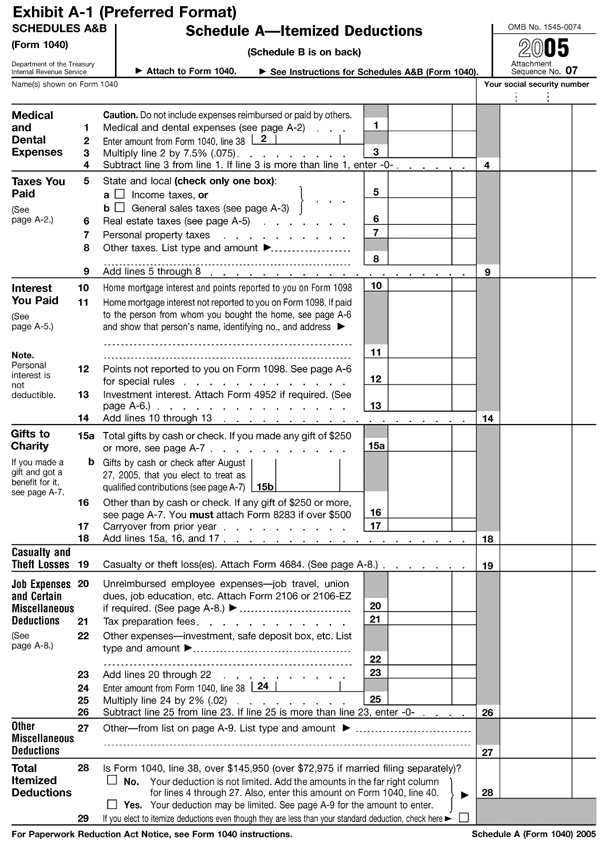
Two sets of exhibits (Exhibits A-1 and 2; B-1 and 2) are at the end of this revenue procedure as examples of how these guidelines may be used. Vertical spacing is six (6) lines to the inch. A combination of upper-case and lower-case print font is acceptable in producing substitute forms. The same logic may be applied to any IRS form that is normally reproducible as a substitute form, with the exception of the tax return forms as discussed elsewhere. These exhibits may be from a prior year and are not to be used as current substitute forms. To be acceptable for filing, a substitute form must print out in a format that will allow the filer to follow the same instructions as for filing official forms. These instructions are in the taxpayer�s tax package or in the related form instructions. The form must be on the appropriately sized paper, legible, and include a jurat where one appears on the published form. The IRS has received returns produced by software packages with approved output where either the form heading was altered or the lines were spaced irregularly. This produces an illegible or unrecognizable return or a return with the wrong number of pages. We realize that many of these problems are caused by individual printer differences but they may delay input of return data and, in some cases, generate correspondence to the taxpayer. Therefore, in the instructions to the purchasers of your product, both individual and professional, please stress that their returns will be processed more efficiently if they are properly formatted. This includes:
If you are a practitioner filling out a return for a client or a software publisher who prints instruction manuals, stress the use of the pre-addressed label provided in the tax package the IRS sent to the taxpayer, when available. The use of this label (or its precisely duplicated label information) is extremely important for the efficient, accurate, and economical processing of a taxpayer's return. Labeled returns indicate that a taxpayer is an established filer and permits the IRS to automatically accelerate processing of those returns. This results in quicker refunds, less manual review by IRS functions, and greater accuracy in names, addresses, and postal deliveries. If you are producing a software package that generates name and address data onto the tax return, do not under any circumstances program either the IRS preprinted check digits or a practitioner derived name control to appear on any return prepared and filed with the IRS. Guidance for the substitute tax forms not covered in this revenue procedure and the revenue procedures that govern their use are as follows.
The publications listed below are available only on the IRS website. Identify the requested document by the IRS publication number.
Copies of tax forms with instructions, publications, draft forms, fillable forms, prior year forms and publications, and other tax-related information may be found on the IRS website at www.irs.gov. The IRS website provides a Tax Products Posting Schedule for the official forms released for use by taxpayers. The schedule has three parts:
The site address is www.irs.gov/formspubs/article/0,,id=103641,00.html. The site will be updated weekly during peak printing periods and as necessary at other times. The planned dates are subject to change. The CD-ROM contains over 3,000 tax forms and publications for small businesses, return preparers, and others who frequently need current or prior year tax products. Most current tax forms on the CD-ROM may be filled in electronically, then printed out for submission and saved for recordkeeping. Other products on the CD-ROM include the Internal Revenue Bulletins, Tax Supplements, and Internet resources for the tax professional with links to the World Wide Web. All necessary software to view the files must be installed from the CD-ROM. Software for Adobe Acrobat Reader is included on the disk. The software will run under Windows 95/98/NT and Macintosh System 7.5 and later versions of these programs. All products are presented in Adobe's Portable Document Format (PDF). In addition, tax publications are provided in the Hyper Text Markup Language (HTML). For system requirements, contact the National Technical Information Service (NTIS) help desk at 703-487-4608. Prices are subject to change. The cost of the CD if purchased via the Internet at http://www.irs.gov/cdorders from NTIS, is $25 (with no handling fee). If purchased using the following methods, the cost for each CD is $25 (plus a $5 handling fee). These methods are:
Tax forms (such as Forms 1040, 1040A, and 1120) require a signature and establish tax liability. Computer generated versions are acceptable under the following conditions.
The following are prohibited.
Certain changes (listed in Sections 5.2 through 5.4) are permitted to the graphics of the form without prior approval, but these changes apply to only acceptable preprinted forms. Changes not requiring prior approval are good only for the annual filing period, which is the current tax year. Such changes are valid in subsequent years only if the official form does not change. You may make minor vertical and horizontal spacing adjustments to allow for computer or word processing printing. This includes widening the amount columns or tax entry areas if the adjustments comply with other provisions stated in revenue procedures. No prior approval is needed for these changes. The horizontal rules and instructions within the name and address area may be removed and the entire area left blank. No line or instruction can remain in the area. However, the statement regarding use of the IRS label should be retained. The heavy ruled border (when present) that outlines the name, address area, and social security number must not be removed, relocated, expanded, or contracted. When the name and address area is left blank, the following format must be used when printing the taxpayer's name and address. Otherwise, unless the taxpayer's preprinted label is affixed over the information entered in this area, the lines must be filled in as shown below.
When there is no in-care-of name line, the name and address will consist of only three lines (single filer) or four lines (joint filer). Name and address (joint filer) with no in-care-of name line: JOHN Z. JONES Name and address (single filer) with in-care-of name line: JOHN Z. JONES The vertical lines separating the format arrangement of the SSN/EIN may be removed. When the vertical lines are removed, the SSN and EIN formats must be 000-00-0000 or 00-0000000, respectively.
No prior approval is needed for the following changes (for use with computer prepared forms only). This line may be compressed horizontally (to allow for same line entry for the name of the qualifying child) by using the following caption: �Head of household; child�s name� (name field). Any line with text that takes up two or more vertical lines may be compressed to one line by using contractions, etc., and by removing instructional references. All lines must be present and numbered in the order shown on the official form. These lines may also be compressed. It is not necessary to duplicate the color screening used on the official form. A substitute Form 1040A may be printed in black and white only with no color screening. No prior approval is needed for the following changes (for use with computer prepared forms only). Specific line numbers in the following headings may have changed due to tax law changes. This line may be compressed horizontally (to allow for a larger entry area for the name of the qualifying child) by using the following caption: �Head ofhousehold; child�s name� (name field). The vertical lines separating columns (1) through (4) may be removed. The captions may be shortened to allow a one line caption for each column. Any other line with text that takes up two or more vertical lines may be compressed to one line by using contractions, etc., and by removing instructional references. The fill-in portion of this line may be expanded vertically to three
lines. The amount entry box must remain a single entry. You may change the line caption to read �Tax� and computer print the words �Total includes tax from� and either �Form(s) 8814� or �Form 4972.� If both forms are used, print both form numbers. This specific line number may have changed. You may change the caption to read: �Other credits from Form� and computer print only the form(s) that apply. It is not necessary to duplicate the color screening used on the official form. A substitute Form 1040 may be printed in black and white only with no color screening. Exhibits of acceptable formats for Schedule A, usually attached to the Form 1040, and Form 2106-EZ are shown in the exhibits section of this revenue procedure.
The format of each substitute form or schedule must follow the format of the official form or schedule as to item captions, line references, line numbers, sequence, form arrangement and format, etc. Basically, try to make the form look like the official one, with readability and consistency being primary factors. You may use periods and/or other similar special characters to separate the various parts and sections of the form. Do not use alpha or numeric characters for these purposes. All line numbers and items must be printed even though an amount is not entered on the line. When a line on an official form is designated by a number or a letter, that designation (reference code) must be used on a substitute form. The reference code must be printed to the left of the text of each line and immediately preceding the data entry field, even if no reference code precedes the data entry field on the official form. If an entry field contains multiple lines and shows the line references once on the left and right side of the form, use the same number of line references on the substitute form. In addition, the reference code that is immediately before the data field must either be followed by a period or enclosed in parentheses. There also must be at least two blank spaces between the period or the right parenthesis and the first digit of the data field. (See example below.) A decimal point (that is, a period) should be used for each money amount regardless of whether the amount is reported in dollars and cents or in whole dollars, or whether or not the vertical line that separates the dollars from the cents is present. The decimal points must be vertically aligned when possible.
You may show the computer prepared internal control numbers and identifying symbols on the substitute if using such numbers or symbols is acceptable to the taxpayer and the taxpayer�s representative. Such information must not be printed in the top 1/2 inch clear area of any form or schedule requiring a signature. Except for the actual tax return form (Forms 1040, 1120, 940, 941, etc.), you may print in the left vertical and bottom left margins. The bottom left margin you may use extends 31/2 inches from the left edge of the form. Descriptions for captions, lines, etc., appearing on the substitute forms may be limited to one print line by using abbreviations and contractions, and by omitting articles, prepositions, etc. However, sufficient key words must be retained to permit ready identification of the caption, line, or item. Explanatory detail and/or intermediate calculations for determining final line totals may be included on the substitute. We prefer that such calculations be submitted in the form of a supporting statement. If intermediate calculations are included on the substitute, the line on which they appear may not be numbered or lettered. Intermediate calculations may not be printed in the right column. This column is reserved only for official numbered and lettered lines that correspond to the ones on the official form. Generally, you may choose the format for intermediate calculations or subtotals on supporting statements to be submitted. Text on the official form, which is solely instructional (for example, �See instructions,� etc.), may generally be omitted from the substitute form. You may not show more than one form or schedule on the same printout page. Both sides of the paper may be printed for multi-page official forms, but it is unacceptable to intermix single page schedules of forms except for Schedules A and B (Form 1040), which are printed back to back by the IRS. For instance, Schedule E can be printed on both sides of the paper because the official form is multi-page, with page 2 continued on the back. However, do not print Schedule E on the front page and Schedule SE on the back, or Schedule A on the front and Form 8615 on the back, etc. Both pages of a substitute form must match the official form. The back page may be left blank if the back page of the official form contains only the instructions. Identify all computer prepared substitutes clearly. Print the form designation 1/2 inch from the top margin and 11/2 inches from the left margin. Print the title centered on the first line of print. Print the taxable year and, where applicable, the sequence number on the same line 1/2 inch to 1 inch from the right margin. Include the taxpayer's name and SSN on all forms and attachments. Also, print the OMB number as reflected on the official form. Negative (or loss) amount entries should be enclosed in brackets or parentheses or include a minus sign. This assists in accurate computation and input of form data. The IRS pre-prints parentheses in negative data fields on many official forms. These parentheses should be retained or inserted on printouts of affected substitute forms. Note. The formats for Schedules K-1 of Forms 1065, 1120S, and 1041 have significantly changed in 2004 and 2005. Because of significant changes to improve processing, prior approval is now required for substitute Schedules K-1 that accompany Form 1041 (for estates and trusts), Form 1065 (for partnerships), Form 1065-B (for electing large partnerships), or Form 1120S (for S corporations). Substitute Schedules K-1 should be as close as possible to exact replicas of copies of the official IRS schedules and follow the same process for submitting other substitute forms and schedules. Before releasing their substitute forms, software vendors are responsible for making any subsequent changes that have been made to the final official IRS forms after the draft forms have been posted. If you feel you will suffer a financial hardship in producing the 2005 Schedule K-1 of Form 1041 because of the significant changes to the 2005 form and format, the IRS will consider allowing deviations from the official form for tax year 2005 only. However, you must include all information on the form. Only deviations in placement and format will be considered. You may prepare a justification and submit it to the IRS at *[email protected] with �Attn: Substitute Forms� on the subject line or: Internal Revenue Service Include the 6-digit form ID code in the upper right of Schedules K-1 of Forms 1041, 1065, and 1120S.
Please allow white space around the 6-digit code. Schedules K-1 that accompany Forms 1041, 1065, 1065-B, or 1120S must meet all specifications. The specifications include, but are not limited to, the following requirements.
Schedules K-1 that are 2-D bar-coded will continue to require prior approval from the IRS (see Sections 7.1.3 through 7.1.5). Standardization for reporting information is required for recipient copies of substitute Schedules K-1 of Forms 1041, 1065, 1065-B, and 1120S. Uniform visual standards are provided to increase compliance by allowing recipients and practitioners to more easily recognize a substitute Schedule K-1. The entity must furnish to each recipient a copy of Schedule K-1 that meets the following requirements.
In an effort to reduce the burden of manually transcribing tax documents, improve quality, and increase government efficiency, the IRS is pleased to provide specifications for 2-D bar-coded substitute Schedules K-1 for Forms 1041, 1065, and 1120S. The IRS encourages voluntary participation in adding 2-D barcoding. Note. If software vendors do not want to produce bar-coded Schedules K-1, they may produce the official IRS Schedules K-1 but cannot use the expedited process for approving bar-coded K-1s and their parent returns as outlined in Section 7.1.5. In addition to the requirements in Sections 7.1.1 and 7.1.2, the bar-coded Schedules K-1 must meet the following specifications.
Prior to releasing commercially available tax software that creates bar-coded Schedules K-1, the printed schedule and the bar code must both be tested. Bar code testing must be done using the final official IRS Schedule K-1. Bar code approval requests must be resubmitted for any subsequent changes to the official IRS form that would affect the bar code. Below are instructions and a sequence of events that will comprise the testing process.
In order to help provide incentives to the software development community to participate in the Schedule K-1 2-D project, the IRS has committed to expediting the testing of bar-coded Schedules K-1 and their associated parent returns. To receive this expedited service, follow the instructions below.
Organizations are permitted to produce substitute tax return envelopes. Use of substitute return envelopes that comply with the requirements set forth in this section will assist in delivery of mail by the U.S. Postal Service and facilitate internal sorting at the Internal Revenue Service Centers. Use the following 5-digit ZIP codes when mailing returns to the IRS Service Centers:
Sorting returns by form type is accomplished by the preprinted bar codes on return envelopes included in each specific type of form or package mailed to the taxpayers. The 32 bit bar code on the left of the address on each envelope identifies the type of form the taxpayer is filing, and it assists in consolidating like returns for processing. Failure to use the envelopes furnished by the IRS results in additional processing time and effort, and possibly delays the timely deposit of funds, processing of returns, and issuance of refund checks. The IRS will not furnish or sell bulk quantities of preprinted tax return envelopes to taxpayers or tax practitioners. A suitable alternative has been developed that will accommodate the sorting needs of both the IRS and the United States Postal Service (USPS). The alternative is based on the use of ZIP+4, or 9-digit ZIP codes, for mailing various types of tax returns to the IRS Service Centers. The IRS uses the last four digits to identify and sort the various form types into separate groups for processing. The list of 4-digit extensions with the related form designations is provided below.
You may use the preparers' company names, addresses, and logos as long as you do not interfere with the clear areas. The government recommends that the envelope stocks have an average opacity of not less than 89 percent and contain a minimum of 50 percent waste paper. Use of carbon based ink is essential for effective address and bar-code reading. Envelope construction can be of side seam or diagonal seam design. The government recommends that the size of the envelope should be 53/4 inches by 9 inches. Continuous pin-fed construction is not desirable, but is permissible, if the glued edge is at the top. This requirement is firm because mail opening equipment is designed to open the bottom edge of each envelope. The above procedures or guidelines are written for the user having envelopes preprinted. Many practitioners may not wish to have large quantities of envelopes with differing ZIP codes/form designations preprinted due to low volume, warehousing, waste, etc. In this case, the practitioner can type or machine print the addresses with the appropriate ZIP codes to accommodate sorting. If the requirements/guidelines outlined in this section cannot be met, then use only the appropriate 5-digit service center ZIP code. Increased standardization for reporting information on substitute Forms 8655 is now required to aid in processing and for compliance purposes. Please follow the guidelines in Section 7.3.2. Please follow these specific requirements when producing substitute Forms 8655.
Electronic filing is a method by which qualified filers transmit tax return information directly to an IRS Service Center in the format of the official IRS forms. The IRS accepts both refund and balance-due individual tax returns that are filed electronically. Anyone wishing to participate in IRS e-file of tax returns must submit an e-file application. The application can be completed and submitted electronically on the IRS website at www.irs.gov or by filing Form 8633, Application to Participate in the IRS e-file Program.
Form 8453, U.S. Individual Income Tax Declaration for an IRS e-file Return, is the signature document for an electronically filed 1040, 1040A, or 1040EZ return not filed with an electronic signature. Form 8453, which serves as a transmittal for associated nonelectronic (paper) documents such as Forms 3115, 5713, 8283, and 8332, is a one-page form and can only be approved through the Substitute Forms Program in that format. Form 8453-OL serves the same purpose for taxpayers filing through online services. For specific information about electronic filing, refer to Publication 1345, Handbook for Authorized IRS e-file Providers of Individual Income Tax Returns. A participant in the electronic filing program, who wants to develop a substitute form should follow the guidelines throughout this publication and send a sample form for approval to the Substitute Forms Unit at the address in Part 1. If you do not prepare Substitute Form 8453 using a font in which all IRS wording fits on a single page, the form will not be accepted. Note. Use of unapproved forms could result in suspension of the participant from the electronic filing program.
This image is too large to be displayed in the current screen.
This image is too large to be displayed in the current screen.Please click the link to view the image. Please click the link to view the image. This image is too large to be displayed in the current screen. Please click the link to view the image. This image is too large to be displayed in the current screen. Please click the link to view the image. This image is too large to be displayed in the current screen. Please click the link to view the image.
Internal Revenue Bulletin 2005-50 SEARCH: You can either: Search all IRS Bulletin Documents issued since January 1996, or Search the entire site. For a more focused search, put your search word(s) in quotes. 2005 Document Types | 2005 Weekly IRBs © 2005, UncleFed.com
|
|
|||||||||||||||||||||||||||||||||||||||||||||||||||||||||||||||||||||||||||||||||||||||||||||||||||||||||||||||||||||||||||||||||||||||||||||||||||||||||||||||||||||||||||||||||||||||||||||||||||||||||||||||||||||||||||||||||||||||||||||||||||||||||||||||||||||||||||||||||||||||||||||||||||||||||||||||||||||||||||||||||||||||||||||||||||||||||||||||||||||||||||||||||||||||||||||||||||||||||||||||||||||||||||